Computer,Handphone,Windows,Android,Linux,IOS,Blackberry

How Easy 3D Displays in Smartphone

How Easy 3D Displays in Smartphone

There are many ways to enjoy the 3D view, including the use of special 3D glasses. But there are other ways that can be used to enjoy 3D holographic technology that makes the glass pyramid.
Only use a compact disk (CD) that is unused and a little help from a video hologram in the smartphone, you can watch 3D images are beautiful. You know, the tools to build a 3D image that can be made?
In a video on YouTube Mrwhosetheboss diunggap, Saturday (08/29/2015), explains how to create a smartphone into a 3D view. Objects that are needed in addition to smartphones is a pencil, scissors, glass cutter, graph paper, and place a CD.
The first step that needs to be done in order to display 3D smartphone is to make pyramid-shaped pattern. The top of the measuring 1 cm, 3.5 cm side, and the base 6 cm. Once the pattern is finished, turn the glass former handled the CD cover.
Remove the edge of the glass former by breaking the CD by hand. After that, put the pattern on the glass where the CD, the image pattern using a glass cutter. Create the pattern up into four pyramids, then paste each of the pyramids so that made getting up space.
To create a pyramid is working, use the smartphone using the video hologram that displays 3D images. Put the pyramid on the top of the smartphone, with the base or bottom of the pyramid on the top. After that, you can see the results.
How to Increase Battery Life of Windows 10

How to Increase Battery Life of Windows 10

Not long ago Microsoft officially launched its latest operating system Windows 10. Many improvements and changes brought by Windows 10, but if one of us was having problems on the notebook battery after upgrading to Windows 10? Here are some tips that may help to meningefisienkan battery usage on Windows 10.


The role of software is critical to the efficiency of use of a battery in a device. Moreover devices such as notebooks that have qualified hardware, so that the energy required is not little. Here, the role of software in managing power consumption required hardware. Windows 10 itself has introduced some features to mengefisiensi battery usage to make it more economical.

Here are some tips to save battery life on Windows 10.

Battery Saver

Battery Saver is a new feature that is present in the Windows 10 operating system which can help you to conserve power on the notebook. You can use your new feature this by going to Settings> System> Battery Saver and you will see the level of battery usage on your device.


Setting, Battery

If you choose open 'Battery Use' will appear details about what components using high power. In this section you can regulate and restrict what services as desired.

Select the link Change background app you can adjust the settings and applications that are running in the background. You can disable applications that run with the panel shifts the mode to "Off" on each application. The applications running in the background can drain your battery power for when not in use, the application remains active to give notification or update information and so forth.
Background-Apps


then select Change Battery saver settings, in the settings you can choose when the power saver is activated automatically, the default settings are usually at a rate of 20% but you can set this level to suit your needs. Give tick on Lower screen brightness while in battery saver and do not give a tick on Allow push notification. You can also menambakan any application that wants to always run in the background with the option "Add an app".
Battery Saver setting

Windows 10 Power & Sleep

The next option is under the battery saver, namely Power & Sleep Another feature to conserve battery life on a notebook.
Power & Sleep


You can configure the notebook screen when you die and in a state of sleep or sleep, while using the battery. You can mengoprek these settings to suit your prefensi respectively.

For setting the power option you can choose the link Additional power settings to settings that will bring the same settings battery with the battery setting in previous Windows versions. In the settings you have probably accustomed to regulate it.


Power Setting
Power Setting

Then the following simple tips to optimize your notebook battery on Windows 10:

     The first is, adjust the screen brightness. Make sure you have set the screen brightness level when using the notebook battery on setting Battery Saver and Power and Sleep.

 
     Turn off the communication services, you can increase the level of your battery life by turning off all communications services such as Wi-Fi, Bluetooth, and others. You can turn off all communication services to enable Airplane Mode / Airplane Mode to toggle out while clicking the notification icon.

Mode pesawat
Airplane mode

     Do not use heavy applications such as gaming, editing with Photoshop, or watch a movie with a high level of rendering. You can run heavy programs when connecting your notebook to the charger.
     Use dark colors for the look of your device, these tips are always advised to conserve battery life. Because basically when the screen displays bright colors such as white, red, and others, tinggkat power usage when using wallpaper to increase rather than black. You can use the theme of black and dark colored wallpaper.
Pilih tema warna gelap
Saving or not the battery in a device does have a lot of other factors, it may be that the quality of the battery has decreased or indeed the overuse heavy program, which certainly requires a lot of power.

Use the Battery Saver feature, and Power & Sleep combined with simple tips above. The above tips may help increase the battery life of your current Windows device 10 is not connected to a charger. A few tips for conserving battery power in devices that use the operating system Windows 10, may be useful for you.
Make Video 360 Makin Easy with This Gadget

Make Video 360 Makin Easy with This Gadget


of course you've seen the video 360 or video 360 degrees which is now popular on YouTube where you can watch an interactive video while moving around the screen to see the video to the left, right, up, and down, of course, more fun to use google cardboard. 


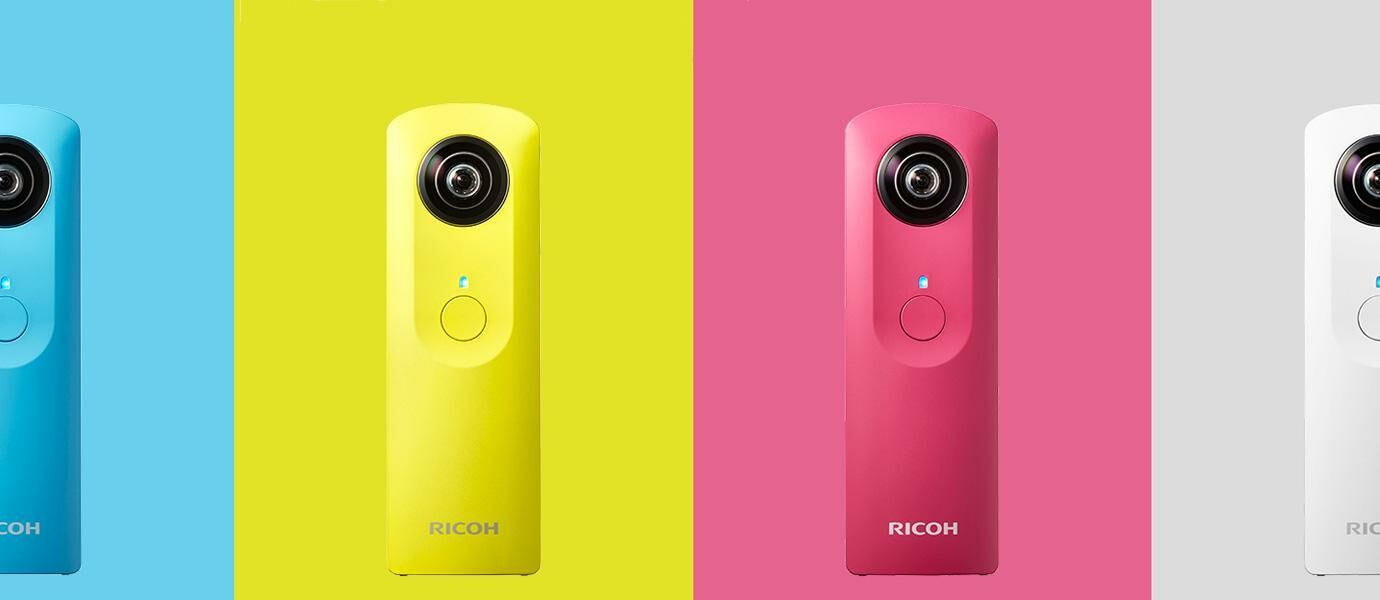
If you are thinking of making a video 360 requires complicated and expensive equipment? This gadget may be an inspiration to you to make video 360 and of course saving in the bag also loh harganya.Ricoh Theta Theta M15 M15 fotoRicoh result is a device that is small enough, even if the see-saw-like Neuralyzer in the movie Men in Black. Ricoh Theta M15 like a camera that can produce images and video 360 degrees. How do I create a 360-degree photos and videos with Ricoh Theta M15? Enough with one click only and you can immediately see the results without the need for editing process to combine pictures or video.
How to Eliminate Annoying Friend Status in BBM

How to Eliminate Annoying Friend Status in BBM

As a user of BlackBerry Messenger aka BBM, you must have had a lot of friends aka BBM contacts in your phone. But among the hundreds of friends, there must be a right that his fuel status lebay? It felt want direct contact delete his fuel. Quiet, Jaka had a trick to overcome it. Here's how to get rid of the status of friends who interfere in the fuel.

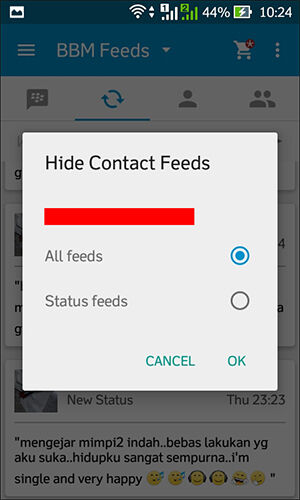
BBM provides a status update feature that is very popular. The BBM users can write a variety of things. Starting from the vent, selling, to entertain with funny BBM statuses. See also: How to make fuel Icon Flag !, replacement BBM display picture is practically also facilitate change the image at any time. But if there is often a disruptive fuel status, remove any that no longer appear in the column feeds the fuel. Here's how:

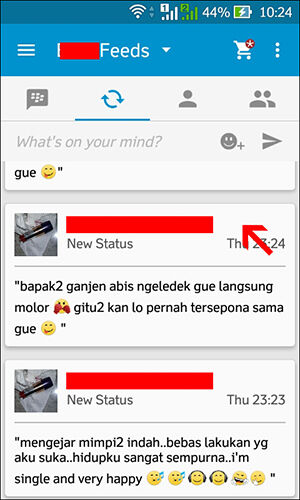
     Open your BBM feeds column.

     Find your friends BBM status disturbing.

     Press and hold a bit longer on the status of your BBM friends.
 

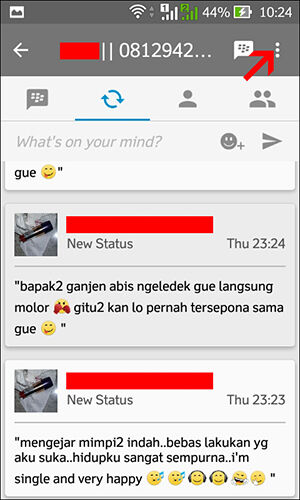
Click the menu icon located in the top right corner.


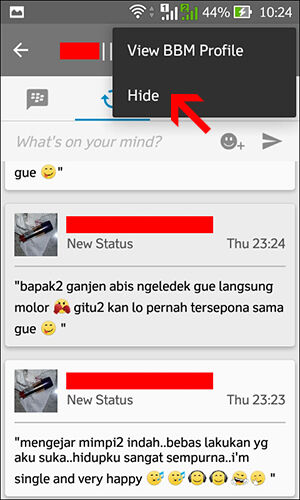
Click "Hide".


Now there are two options to remove the fuel status of your friends. "Status feeds" to get rid of the status of the fuel in the form of writings, while "All feeds" to hide the fuel status and also drawing its fuel DP as well. So the status of fuel or fuel DP pictures of your friends would never again appear in your BBM Feeds column.

That means get rid of the status of friends who interfere in the fuel without having to delete the contact. Hopefully BBM's activities you more exciting and fun.
4 Ways to Detect Virus Infected Computer

4 Ways to Detect Virus Infected Computer

Internet is easier for users to communicate and carry out various activities. On the other hand, the Internet became a favorite place for the virtual dedemit to spread malware and infect hundreds of thousands of computers around the world.
Malicious programs (malware) is considered as the culprit of the most annoying for computer users. If your computer has been infected with malware, surely you already know how troublesome to clean the malicious program. If you have this, do not delay to immediately clean your PC from malware infections that do not do more damage or infect other computers.
Malware is a computer program that is designed to damage a computer hard drive and perform various other operations that are destructive. While the virus is one of the most popular computer malware. The virus is one of the most damaging types of malware. The damage range from eliminating the files on the computer to cause the computer to crash.
Well, how to recognize the infected computer malware? Here are four (4) that can be tried to anticipate further spread:
1. Use softwareOne of the easiest ways to detect virus-infected PC is to use the software. Thousands of anti-malware application is available on the Internet, both of which can be obtained free of charge or for a fee, such as MalwareBytes or Spybot Search & Destroy. There are also some antivirus tools that can scan for viruses simultaneously malware. The thing to remember is that you must regularly scan your PC regularly and it updated with the latest patches. If not, the possibility of malware detected more and more and will be more difficult to clean.
2. PC slowMalware is generally cause the system to be slow, either a network connection or speed using the application (or open / close the application). If your PC suddenly slows down, the first step to take is to defrag the hard drive, then add RAM (memory). If the PC is still too slow, the possibility of PCs infected with malware.
3. Emerging pop-upOne sign of PCs infected with malware is a pop-up. The emergence of pop-up pornography as a result of malware increasingly becoming a trend lately. If on your PC a pop-up unwanted (particularly that appear even if you do not open a browser), this being one of the signs that the PC has been infected with malware. Generally, pop-ups can not be removed in a standard fashion. In this case, the PC must be booted to the mode "Safe Mode". You also likely require anti-malware application that reliable to remove it.
4. Home page and or link changeIf the browser home page changes when you do not tamper add modifiers, most likely PCs infected with malware. The same thing applies when you are searching a topic in the search engines (Google, for example), then click on the link provided by Google and then you are directed to another link at random. If you look at the 'behavior' like this, your PC is likely infected with malware or viruses.
BlackBerry Messenger Update

BlackBerry Messenger Update

For BlackBerry users who are still using the old version of BlackBerry Messenger and BlackBerry Messenger will update it to the new version, please update the Official BlackBerry Messenger v6.1.0.49.
Features of BlackBerry Messenger (BBM) version 6.1.0.49:
Support for Animated Avatars - display pictures can now be animated!
Enjoy a new selection of Emoticons
Double the space to update your Personal Messages
Customize the color of chat bubbles for your contacts
Simpler display picture update from the camera app - snap a picture and display it on the fuel right away
Please download via BlackBerry App World. Do not forget to backup contacts on BlackBerry Messenger (BBM) before the upgrade and restore your contacts back in your fuel, when in trouble with BBM Display Picture contacts that do not appear read Diagnostics Test.
Download via OTA from your BlackBerry browser:
Official OTA BlackBerry Messenger v6.1.0.49
Create Zip in Linux

Create Zip in Linux


First prepare the first application you want to pack into zip
Then, put it in the Desktop and the input folder
Enter the terminal, type cd Desktop to go to the Desktop
then enter this command:

zip -r yourfoldersname.zip yourfoldersname

EXAMPLE:
zip -r mycolection.zip mycolection

zip -r is pulled-pack command to be zipped, and
mycolection.zip are the results so its name and style = "color: red;"> mycolection is the name of the folder that will be in the pack.

Now in check, its result, CLICK 2X only on the zip file before, and if it is there, it means success: D
How To Upgrade IOS 6 to IOS 7

How To Upgrade IOS 6 to IOS 7

How to Upgrade to iOS 7 iPhone - iOS is the operating system vendor dikemangkan by Apple for smartphone and tablet devices. The operating system is exclusive only to devices made Apple, unlike Android which can be adopted by any device. This current generation iOS has entered into iOS 8 which will be applied to the iPhone 6 in full. only this time the iPhone and iPad users are still many that use a version of IOS 6. It has been a year when Apple released iOS 7 which claimed much better and have more advanced features. Only some users are constrained when you want to upgrade your iPhone to iOS version 7 because some things like bug that makes many devices become incompatible.
iOS-7-concept-Simply-Zesty

Well, for those of you who are still using iOS version 6, Teknohape will give way to the iPhone upgrade iOS 7 with several methods, she tutorial;
Preparation:
Save or back up data or files first considered important such as photos, contacts, applications, etc. We recommend using iCloud service to back up.
Prepare space or insufficient memory space. If necessary, remove some of the data that are not too important for later installation goes well.
Update iTunes prior to the most recent version. Because often when you're doing an upgrade to iOS 7, the installation went less smoothly gara gara iTunes that has not been updated.
Prepare the battery is at least 80% or even better when the battery is full.
How to Upgrade your iPhone to iOS 7
To upgrade step, there are two kinds of ways, namely via OTA (Over The Air) and through iTunes. Both methods require an internet connection with a large enough data quota. Therefore, it is important to ensure your internet is still valid and has sufficient quota to download the update. Here are the steps;
Upgrade iPhone via OTA
Via OTA Upgrade option is the easiest, way enough access app menu Settings - General - Software updates via your iPhone device. after which it will appear Agreement or approval, select yes and the update process will run until the installation is complete. If you do not have enough data, we recommend using only a WiFi network.
Upgrade iPhone via iTunes
Here it is the function of the iTunes update as suggested in earlier preparatory step, which is to perform the update iOS. do enough to connect the iPhone with iTunes. wait until iTunes check the device, then there will be a poo up dialog that offers two options namely pgrade your iphone Download Only and download and updates.
Download Only an option where iTunes will download the update file to upgrade iOS 7 and offline / manual. The trick after the update file is downloaded just select the Summary menu - Check for Updates and then simultaneously by pressing the options and resistant. This method is the same as when we do update firmware via PC.
While the second major option that allows updates Download and automatically update as via OTA, so it is much more simple.
That's how to upgrade your iPhone to iOS 7 that you can practice, to be considered is for some kind of iPhone there is no match with this version as the iPhone 4, iPhone 4S, iPhone 5, iPad Mini, iPod Touch 5, iPad 2, iPad 4th Gen 5.
Back To Top