Computer,Handphone,Windows,Android,Linux,IOS,Blackberry

Google Apps Promote Popular iOS and Android in the Home Page

Google Apps Promote Popular iOS and Android in the Home Page


Google, the giant search engine under the auspices Alphabet, featuring simple page. Apparently, Google utilizes it to promote its application.

As reported by Ubergizmo, under the Google logo, a search box and a few buttons there are the words, "Unwrap the best of Google for Android and iOS". In the article "Android" and "iOS" when clicked will take you into the new page.

The new page that allows you to see a list of applications designed for Android and iOS. Interestingly, Google currently provides as many as 62 applications for iOS, but it is a serious rival OS Android.

A total of 62 applications available for IOS ranging from applications like Gmail to the specific application for webmasters and content creators YouTube.
SONY XPERIA Z5 DUAL

SONY XPERIA Z5 DUAL


Although performed with concepts seem monotonous, but the Xperia Dual Z5 is much carries the latest innovations. Call it the fingerprint sensor technology that is extremely useful for protecting the phone, and also an increase in the camera sector. In addition to carrying the largest range of flagship resolution on the market, Z5 Xperia Dual camera also adopts the latest technology in Sony Alpha line of digital cameras and of course will have a performance that can not be doubted.

Waterproof and Dust
Sony Xperia Z5 Dual apply the concept design that is not much different from the previous Xperia Z Seris, namely OmniBalance. Only, in this Z5 layer of protective glass back cover is no longer clear, but opaque. But still able to protect the body from scratches sharp objects. In addition, this smartphone also uses metal frame and has a size sufficient precision.
Certification in accordance with IP65 / 68 which dikantonginya, Z5 Dual still presents unique technology Sony 'Xperia Z Series "that is waterproof and dust. That is, this smartphone can be used in 'wet-basahan "aka rain nor invited to' swim ', but should not in seawater. Because the protective rubber components become 'deterrent' will be more easily damaged if exposed to sea water instead of plain water.

As with Xperia and Xperia Z3 M4 Aqua, although waterproof, but a micro USB port and audio jack in Xperia Z5 also does not shut down a special coating. But if you want to use, you should make sure the port is completely dry so as not damaged.

Compartment applied Xperia Z5 is still the same with Sony's other flagship. Call it the SIM tray and microSD. Position in the side of the body and has a special water-resistant cover. Yes, according to the unibody concept and technology carried Xperia. However, the concept of two SIM slots in one panel made of plastic, feels a little less comfortable. Moreover, the model of the SIM cards are used both nano-SIM. Unlike Oppo R7 Lite which offers the option of micro-SIM and nano-SIM.

Fingerprint Sensor
Unlike the Xperia Z Series lineup others who use the power button protruding round, in this Z5 Sony Xperia bring new innovations in the form of elongated and flat power button that also functions as a fingerprint scanner (fingerprint sensor). Compared to competitors like LG G4, the position of the fingerprint sensor on the Xperia Z5 is fairly little more comfortable. Easily accessible with one hand.

Plusnya points, fingerprint sensors on the smartphone is capable of detecting 5 different fingerprints. That is, you can set the fingerprint security with 5 of your finger, or it could be with a finger other people / families. Unfortunately, this sensor only serves to lock the screen (lock screen), not to protect specific files or data.

In addition, the fingerprint sensor on the Xperia Z5 Dual also been supported FIDO standard that allows you to use it for authentication of online payments.

Camera with Sony Alpha Technology
As well Z5 Z5 Compact and Premium, in this Dual Sony Xperia Z5 also embed the technology in digital cameras Sony Alpha. Sensor 1 / 2.3 23 MP Exmor RS F2.0 G lens combined with Sony's own plus Bionz for mobile which is claimed to make the picture clear and vivid.

Plusnya points, Dual Z5 camera is powered super fast autofocus capability, which is about 0.03 seconds. Faster than the average smartphone that is still in the range of 0.1 seconds such as Oppo R7 Lite. However, if compared with smartphones that uses laser sensor technology (Laser Autofocus) such as LG G4 or Asus Zenfone 2 Laser, the speed does not much different.

To reach the speed of the hybrid autofocus, Dual cameras Sony Xperia Z5 uses two existing technologies in digital cameras Sony Alpha, the Phase Detection AF (PDAF) to respond fast shutter speed and Contrast Detection AF for added precision images.

For the hobby macro picture, this smartphone camera sensors supported Clear Image Zoom 5x and 8x digital zoom to minimize picture quality deterioration. But so that the images can be maximally close range, you should reduce the use zooming features. Based on the results of our test photo using the zooming method is still often decorated noise (blur).

But overall, the quality of images produced Xperia Z5 Dual camera is not in doubt. The images are able to perform optimally with a clear image details and radiant colors are quite natural. Konsisi including in low-light (Low Light). For dark conditions, you can utilize ISO settings manually with the option of a maximum of up to 12,800.

To accommodate the trend selfie, Xperia Z5 also embed Dual front camera with a resolution high enough. Although not as big as the front camera Xperia and Xperia C5 Ultra M5, but the images produced quite good.

Your new users and do not quite understand the techniques of the photos, but want to produce quality photos, do not be afraid. Because the Sony Xperia Z5 camera was equipped with a series of features including a selection of the latest and resilient Superior Auto mode. You choose this mode and does not need to make other arrangements to have this photo results you want.

Other plus points are also owned by the main camera Xperia Dual Z5 is the ability to record 4K video. As for the front camera, a little beneath the Full HD 1080p video. Interestingly, this camera phone is equipped with the latest technology on the evolution of additional features SteadyShot with Active Intelligent mode. This renewal enables you to record moving video to be smooth and of good quality remains minimal shock / vibration (blur).

Full HD screen for Photo and Best Video Display
Slightly different than the Xperia Z5 Compact which only carries HD screen, in this Dual Xperia Z5 Triluminos screen technology combined with X-Reality Engine measuring 5.2 inches is Full HD 1080p. As a result, the display image while watching the video so much more 'real'.

Like the Xperia Z Series previously, anti-scratch screen Xperia Dual Z5 can still be accessed by using a glove finger. However, you must first activate the "Glove Mode" in the display settings.

Dual SIM 4G LTE
This sector seems to have been too often discussed in any review of the flagship smartphone. On average, all the existing means of connection and current trends accommodated complete. Including the ability Dual SIM Dual Standby, which also features settings option is fairly easy alias 'meticulous'.

And that deserves to be underlined, almost all existing flagship smartphones including Sony Xperia pasran this Dual Z5 supports 4G LTE network Cat.4 for high speed data access. Xperia Z5 in Dual, the 4G LTE network can be used in both the SIM card slot and of course supports all LTE frequency band in the country.

Qualcomm Snapdragon 810 and 3 GB RAM
Problem offal, Xperia Dual Z5 still use the same hardware with the Xperia Z3 +. Only use the most recent version of the chipset and have gained relevant improvement over heating the many complaints of smartphone users who use the Qualcomm Snapdragon 810. Related to the performance, the Xperia Z5 is equipped with 3 GB of RAM, a notch above the Xperia Z5 Compact that only 2 GB.

Based on the results of our monitoring throughout the test, the performance of the hardware Xperia Z5 quite good. Although sometimes still feels warm when used for a certain period as well as the mastermind in a state of active connections, but the heat is not excessive. In tests Xperia Z3 we've ever done, over heating causes some functions such as the camera can not be used and must wait for the phone 'cold', in the incident Dual Xperia Z5 arguably not found.

Based on our test results using AnTuTu benchmark applications, Sony Xperia Z5 Dual posted a score of around 51754. Higher than the HTC One M9, Meizu MX5 and LG G4. While with Geekbench, the results of single-core multi-core 1052 and 3634. Far above its rivals in its class.

Latest Audio Technology
To support multimedia performance, particularly music player better known as platform Sony Walkman, Xperia Z5 brings Sony's latest audio technology that is DSEEHX that carry audio fidelity available from the start of MP3, AAC or Spotify to high resolution audio quality. Especially for listening to music wirelessly, Sony LDAC codec capable of transmitting data three times more efficient than transmission through Bluetooth. However, to be able to enjoy a different sensation you have to use a special headset.

In addition, the music player Xperia Z5 also still presents other options such as equalizer, surround sound, Mega Bass to produce different sensations while enjoying music and watching videos. As an alternative, Xperia Dual Z5 also features an FM radio.

For those who like jamming game, Z5 Xperia PlayStation Dual also supported applications and integrates well with the PSN (PlayStation Network). You also can connect this device with the PS4.
Here Blackview Ultra Plus, the iPhone clones are Rely 6s Plus Camera Features

Here Blackview Ultra Plus, the iPhone clones are Rely 6s Plus Camera Features


Many new vendors from China who released a new line of smartphones to compete with other brands. Some are carrying the design of their own, some are not half-hearted to mimic other competitors. One is Blackview, new name this time enliven smartphone pesar global level.

in contrast to Apple's latest smartphone.
Not just end there, Blackview Ultra Plus is also equipped with a circular physical button, which is located in front. This certainly proves that Blackview Ultra Plus clones of iPhone 6s Plus. However, the physical button is of course different from the physical buttons found on the iPhone device 6s Plus as the smartphone is not equipped with Touch ID.

Problem specification, Blackview Ultra Plus is equipped with a smartphone like intermediate component. Call it the use of MediaTek MT6735 SoC already octa core, paired with Mali T720 GPU. For RAM, the smartphone is planted with 2GB of RAM, and internal storage capacity of 16GB.

The screen on Blackview Ultra Plus is also similar to the iPhone 6s Plus, the area of ​​5.5 inches, with resolution of 720 × 1280 carried px aka HD. Well for the camera, this smarthone use 13 megapixel camera that uses sensors from Sony IMX 164, and also a front camera with a 5 megapixel strength.

done, was really like ya Blackview Ultra Plus with iPhone 6s Plus?
iPhone 7 will feature a waterproof, Equipped Large RAM

iPhone 7 will feature a waterproof, Equipped Large RAM


Smartphone from Apple, the iPhone series 6s and 6s plus was recently released. Smartphone that brings 3D features Touch is indeed priced at a not cheap. But did not dampen buying interest loyal fans of Apple, because sales can be fairly popular, especially for Rose Gold color variant of the dream.

Now there are rumors saying that the series next iPhone will be the next generation iPhone 6s and 6s Plus is carrying some interesting features. Quoted from WCCFtech, Sunday (23/11/2015), 7 rumored iPhone will release in the next year has a variety of speculation. As we've discussed before, both from the design concept iPhone 7 itself, and even rumors will use the new chip.

iPhone 7 reportedly will have one of the features that Apple has not previously been used in various devices, namely waterproof feature. This feature may already commonly used by Apple's smartphone competitors, such as Sony faithful carry the Android operating system.Obviously this is the first time Apple embed waterproof feature on the device, so the iPhone 7 will be the first Apple device that carries anti-water system. Unlike its wearable devices, Apple Watch, which is only resistant to water splashes, not really waterproof.

In addition, other rumors say that it will carry the iPhone 7 3GB RAM. Again the use of RAM is not commonplace in the competitors. It looks like Apple wants to increase the performance of the iPhone 7, given the iPhone 6s and 6s Plus only now use 2GB of RAM.Still can not be justified in this case, because Apple itself is still silent about the continuation of the latest generation iPhone. However, recent rumors say that Apple will release an iPhone with 4-inch screen back, which allegedly is the iPhone 6c.
Sasar Low End Market, This Specifications and Price Oppo A33

Sasar Low End Market, This Specifications and Price Oppo A33

Oppo is not a newcomer to the world of smartphones. Companies from China has also released some of their smartphones in the Indonesian market. But this time, Oppo wants to try his luck with the release of the smartphone market targeting low end.Quoted from VR-Zone, Sunday (22/11/2015), reported today Oppo announces A33 series are ready to compete with the low end smartphones on the market. Surely by targeting the low end, Oppo A33 brings some specifications that could be considered standard.
Call it the use of SoC from Qualcomm, Snapdragon 410 that ran dikecepatan octa core 1.2 GHz. To support multitasking activity, RAM planted on the smartphone 2GB, just like most smartphones currently available.Do not forget there is a camera of 8 megapixels for the rear, and a 5 megapixel camera for front camera. As well, to save the photo files or other multimedia files, Oppo A33 is equipped with 16GB of internal storage memory, which can be expanded using micro SD memory card.


Unfortunately Oppo A33 is still using the alias QHD resolution of 540 × 960 screen size of 5 inches of hers. Unlike most of the low end smartphones on average been carrying HD screen with a resolution of 720 × 1280. But all of it treated with super-fast internet network support 4G LTE. The operating system that was adopted on Oppo A33 is Android 5.1.1 Lollipop, which has been modified by the Oppo to Color OS 2.1.


Reportedly this smartphone while still marketed to China alone. There's no word on the availability of more than Oppo globally. For the price, Oppo set for 1499 Yuan, or about 3.2 million rupiah to bring the gathering Oppo A33.
Asus Zenfone Max

Asus Zenfone Max


Asus has launched some newest Zenfone line to Indonesia, and each smartphone has different advantages. One Zenfone smartphone that has the unique advantage is the Asus Zenfone Max. Yes, as the name implies this smartphone has a very large battery capacity, namely 5.000mAh.

With a battery capacity of that size, so no need to worry again will run out of battery, because this smartphone is claimed to last up to two days for standard usage. Whereas if used for gaming, this smartphone can last up to 15.3 hours. All this thanks to technology Asus buried on smartphones, in the form of a battery capacity of 5.000mAh. Despite having a fairly large battery capacity, does not make the body become more bongsor smartphone.


Interestingly, not only the battery capacity are large, with technology owned smartphone, you can use the Asus Zenfone Max as a power bank to charge your other gadgets. Just simply connect the two devices with a micro USB cable, then automatically the other devices connected to Zenfone Max will be filled up.As for the other spesifiaksi, Zenfone Max comes carrying area of ​​5.5-inch IPS screen 720p HD resolution that has been coated with Corning Gorilla Glass 4 strong famous. For the jeroannya, this smartphone powered by Snapdragon chipset 410 has a 1.2 GHz quad-core processor. 

Running Android 5.0 Lollipop, this smartphone also has 2GB of RAM which is fairly enough for multitasking activities. For the capacity of the internal memory, this smartphone has a memory of 16GB which can still be expanded using micro SD up to 128GB capacity. 
In the sector of photography, this smartphone ranks equally with the latest Zenfone recently launched in Indonesia. The main camera is powered 13MP smartphone equipped with dual tone laser autofocus and LED flash that can capture the focus quickly. Meanwhile, this smartphone powered front camera 5MP which can meet the needs selfie. 
In Indonesia, a smartphone that supports LTE 4G network will be priced at Rp2,499.000. As for the availability of color there will be two colors, namely black and white. 
Specifications Asus Zenfone Max: 
Screen: 5.5 IPS, HD 720P 
Chipset: Qualcomm Snapdragon 410 
CPU: Quad core 1.2 GHz 
RAM: 2GB ROM: 16GB, micro SD up to 128GB Front 
Camera: 5MP Rear Camera: 13MP, dual LED flash tone , laser autofocus 
OS: Android 5.0 Lollipop, ZenUI 
Battery: 5.000mAh 
Networks: 2G, 3G, 4G LTE 
SIM: Dual SIM, micro SIM 
Colors: Black White
How To Enjoy BlackBerry Priv in your Android

How To Enjoy BlackBerry Priv in your Android


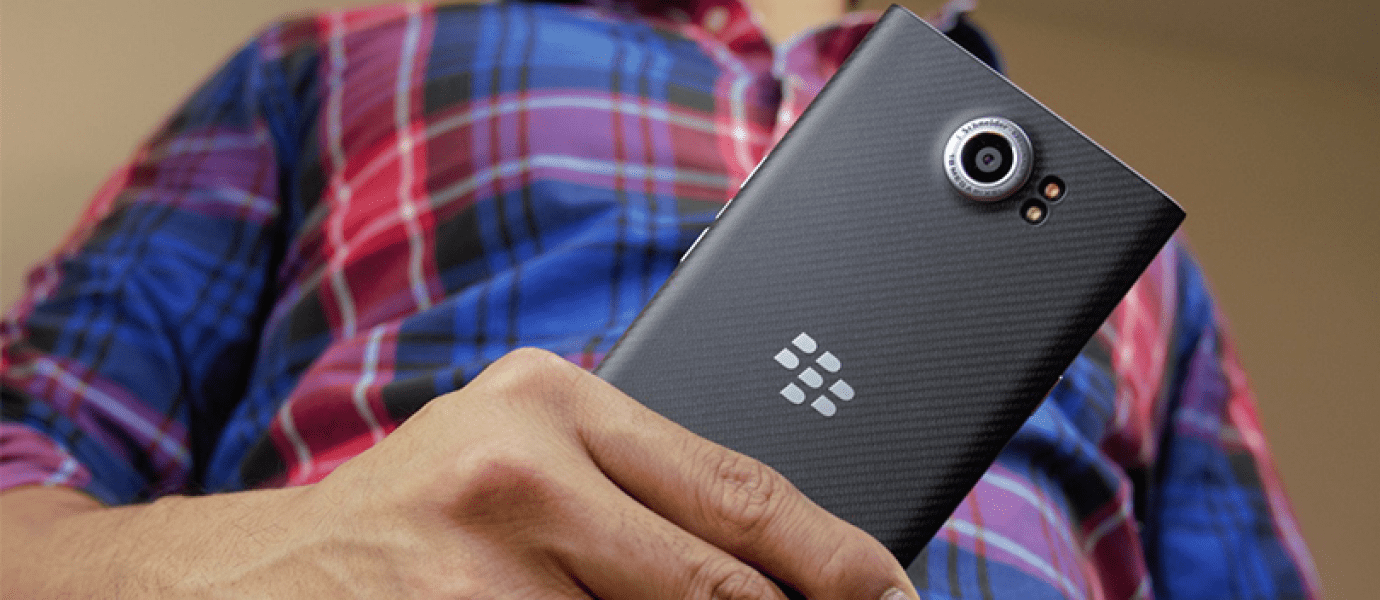
BlackBerry Priv indeed be Android devices are much discussed lately. Not because the Blackberry are turning to the Android operating system, but also because the BlackBerry promising experience of using Android are different from other Android. Want cobain BlackBerry Priv? Here's how to enjoy on your Android BlackBerry Priv.

Being ranked first with Android operating system apparently did not make the BlackBerry membanderol BlackBerry Priv at a fairly cheap price. Rumors, BlackBerry Priv priced at USD 9 million. Sure you want to buy?

How to enjoy the BlackBerry Priv in Android You
You must be curious to BlackBerry Priv, right? Not just because of the design of the BlackBerry Priv interesting, but also because the BlackBerry promises a new experience using Android to BlackBerry Priv. What if Jake invite you to try the experience of using the BlackBerry priv in Android?

1. Install BlackBerry Launcher

First, equip BlackBerry BlackBerry with BlackBerry Launcher Priv. Launcher the flyer on the BlackBerry Priv not just ordinary launcher, but is equipped with special features that are unique and fresh. To be able to enjoy the BlackBerry Priv, let's first install BlackBerry Launcher on your Android Jaka from the link provided. Minimal Android operating system Lollipop yes!

Do not forget to install the BlackBerry service also, so that BlackBerry Launcher can run perfectly manicured.

In contrast to most of the launcher on Android, BlackBerry Launcher comes with a fresh look. Lollipop Brings Android 5.1.1 operating system, it turns out the BlackBerry thoroughly overhaul the look of the flyer launcher on the BlackBerry Priv.

Because BlackBerry Prive using on-screen navigation buttons, very unfortunate in Android Jaka who do not use the on-screen navigation buttons so there is space at the bottom of the pane homescreen and app drawer her. Overall, it looks fresh instead?
Updating your device using iTunes

Updating your device using iTunes


If you can not update wirelessly, you can update it with iTunes. If the computer you are using Personal Hotspot on your iOS device that you update, connect your computer to different networks.

     Install the latest version of iTunes on your computer.
     Connect the device to the computer.
     Open iTunes and select the device.
     Click Summary, then Check for Updates.
     Click Download and Update.

If you see an error message in iTunes or require a greater capacity for renewal

Get help when seeing an error message when updating the device with iTunes. Or if you need a greater capacity for renewal, you can delete content from the device manually.
How To Update IOS software on the iPhone, iPad, or iPod touch

How To Update IOS software on the iPhone, iPad, or iPod touch


Learn how to update your iOS device wirelessly or using iTunes. IOS update introduces new features that you can use to do more things with the iPhone, iPad, or iPod touch. Make sure you always update your device in order not to miss the latest features.Before you start
Create a backup of your devices using iCloud or iTunes.
Updating your device wirelessly
If a message stating that the update is available, tap Install Now. You can also follow the steps below:

    
Connect the device to the power supply and connect to the Internet with Wi-Fi.
    
Tap Settings> General> Software Update.
    
Tap Download and Install. If the message requested that the application be removed for iOS requires a greater capacity for renewal, tap Go or Cancel. Then, IOS will reinstall the removed application. If you tap Cancel, learn the actions that need to be done next.
    
To update them now, tap Install. Or you can tap and choose Install Later Tonight or Remind Me Later. If you tap Install Tonight, simply connect the iOS device to the power supply before you go to bed. Throughout the night, the device will be updated automatically.
    
If prompted, enter your passcode.
If you need greater capacity to wirelessly update
If you need greater capacity to update wirelessly, you can update using iTunes or manually delete content from the device. Do you use iTunes or update wirelessly, you will have the same amount of storage capacity in the device after updated.
Some software updates iOS is not available wirelessly. VPN or proxy connection may make the device can not contact the server updates iOS.
How to Add RAM To Android You Do not Slow

How to Add RAM To Android You Do not Slow


HP makes Android not slow fast alias is the desire of everyone. By no later than the Android, will speed up the process of multitasking that is definitely done in Android.
Android becomes slow biggest cause is the lack of RAM (Random Access Memory). If Android you have 3GB of RAM, you may rarely or never feel any lag when running Android. However, if a 1GB or under it, surely it is often the case.
Also Read:

    
Tips to Make more RAM Lightweight Currently Browsing
    
BBM for Android Settings Tips To Not Boros Memory and RAM
    
How to Regram Photos on Instagram on Android Smartphone
To overcome the limitations of RAM, you can use the following applications. With this application, you can add and maximize the use of RAM and also stop applications is not important who spent RAM. How to?


Here is How to Add RAM and Android Makes Not Slow with Smart Booster

    
Smart Booster download and install as usual in Android.
    
Smart Booster 4.6.762

    
Once installed, open its Smart Booster and then click Start Now. To initiate the release of RAM, you can press the icon image Rocket.

    
To release more RAM, go to Settings and select menu Ram Boost Boost Level and change it into Aggressive.

    
Still on the menu Ram Boost, Boost check when screen off and change also Delay to boost the screen off when it became Immediately.Agar you do not release RAM continuously, you can check RAM Boost automatically change the threshold (MB) to 100MB and set Boost his interval to 5 minutes or longer.

    
(Optional) If you are already in the Android-root, you can try this way. Go to the menu and tick Experimental Root RAM Booster. This will increase the release of RAM.

    
Here is the appearance before and after the release of the Smart RAM Booster
How to turn off the Windows Update feature in Windows 10

How to turn off the Windows Update feature in Windows 10

The latest operating system from Microsoft this seems to be an operating system that needs little dikulik in order to enjoy it. Because, for general users, Windows 10 will update automatically without informing in advance.


Luckily for you who have unlimited connections, well what if you are an Internet user with the quota system? Certainly in the blink your quota will be exhausted, especially as this case, which secretly Windows 10 takes quotas 6GB without the knowledge of users. Well this time, we will discuss together how to turn off this feature of Windows Update.

First, go to the Control Panel menu on the windows start menu, or simply typing "control panel" in the search section.


Upon entry to the Control Panel, select System and Security and click on Administrative Tools.


In the Administrative Tools window, we will be faced with many choices, select the Services by clicking 2 times.


Once entered into the Services menu, browse down to the bottom, looking for the name of the Windows Update service. Then click 2 times on the option Windows Update and click stop. In the Startup Type, select to Disabled and wait a few seconds.


Congratulations, you've Windows 10 will not run the automatic update feature. Please note that this feature only stop the update of the operating system Windows 10 only, not including updates of anti-virus or other programs.

If you want to reactivate it, the process is the same, only on a select part of Startup Type to Automatic and restart your computer.


Cell phone batteries Hold Up 1 Week Finally Become Reality

Cell phone batteries Hold Up 1 Week Finally Become Reality


Smartphones that can live for a whole week without having in-charge guys seem to have been closer to reality. A company called Intelligent Energy reported that they had just created a miniature of a hydrogen-powered battery cell which is fit for embedded into the body of the iPhone 6

The prototype of a hydrogen-powered battery has been tested and the results are very satisfactory. Imagine, iPhone 6, which usually only last for a day of when using a conventional battery was finally able to burn for one week without having in-charge. It seems almost impossible ya if Apple is ignoring the good results of this research.

By the way, in fact Intelligent Energy chose the iPhone 6 as a trial not specifically know. Their main goal remains to develop hydrogen batteries for a wide range of devices, not limited only to one vendor. Let us look forward, yes how continuation of this excellent info.
How Easy 3D Displays in Smartphone

How Easy 3D Displays in Smartphone

There are many ways to enjoy the 3D view, including the use of special 3D glasses. But there are other ways that can be used to enjoy 3D holographic technology that makes the glass pyramid.
Only use a compact disk (CD) that is unused and a little help from a video hologram in the smartphone, you can watch 3D images are beautiful. You know, the tools to build a 3D image that can be made?
In a video on YouTube Mrwhosetheboss diunggap, Saturday (08/29/2015), explains how to create a smartphone into a 3D view. Objects that are needed in addition to smartphones is a pencil, scissors, glass cutter, graph paper, and place a CD.
The first step that needs to be done in order to display 3D smartphone is to make pyramid-shaped pattern. The top of the measuring 1 cm, 3.5 cm side, and the base 6 cm. Once the pattern is finished, turn the glass former handled the CD cover.
Remove the edge of the glass former by breaking the CD by hand. After that, put the pattern on the glass where the CD, the image pattern using a glass cutter. Create the pattern up into four pyramids, then paste each of the pyramids so that made getting up space.
To create a pyramid is working, use the smartphone using the video hologram that displays 3D images. Put the pyramid on the top of the smartphone, with the base or bottom of the pyramid on the top. After that, you can see the results.
How to Increase Battery Life of Windows 10

How to Increase Battery Life of Windows 10

Not long ago Microsoft officially launched its latest operating system Windows 10. Many improvements and changes brought by Windows 10, but if one of us was having problems on the notebook battery after upgrading to Windows 10? Here are some tips that may help to meningefisienkan battery usage on Windows 10.


The role of software is critical to the efficiency of use of a battery in a device. Moreover devices such as notebooks that have qualified hardware, so that the energy required is not little. Here, the role of software in managing power consumption required hardware. Windows 10 itself has introduced some features to mengefisiensi battery usage to make it more economical.

Here are some tips to save battery life on Windows 10.

Battery Saver

Battery Saver is a new feature that is present in the Windows 10 operating system which can help you to conserve power on the notebook. You can use your new feature this by going to Settings> System> Battery Saver and you will see the level of battery usage on your device.


Setting, Battery

If you choose open 'Battery Use' will appear details about what components using high power. In this section you can regulate and restrict what services as desired.

Select the link Change background app you can adjust the settings and applications that are running in the background. You can disable applications that run with the panel shifts the mode to "Off" on each application. The applications running in the background can drain your battery power for when not in use, the application remains active to give notification or update information and so forth.
Background-Apps


then select Change Battery saver settings, in the settings you can choose when the power saver is activated automatically, the default settings are usually at a rate of 20% but you can set this level to suit your needs. Give tick on Lower screen brightness while in battery saver and do not give a tick on Allow push notification. You can also menambakan any application that wants to always run in the background with the option "Add an app".
Battery Saver setting

Windows 10 Power & Sleep

The next option is under the battery saver, namely Power & Sleep Another feature to conserve battery life on a notebook.
Power & Sleep


You can configure the notebook screen when you die and in a state of sleep or sleep, while using the battery. You can mengoprek these settings to suit your prefensi respectively.

For setting the power option you can choose the link Additional power settings to settings that will bring the same settings battery with the battery setting in previous Windows versions. In the settings you have probably accustomed to regulate it.


Power Setting
Power Setting

Then the following simple tips to optimize your notebook battery on Windows 10:

     The first is, adjust the screen brightness. Make sure you have set the screen brightness level when using the notebook battery on setting Battery Saver and Power and Sleep.

 
     Turn off the communication services, you can increase the level of your battery life by turning off all communications services such as Wi-Fi, Bluetooth, and others. You can turn off all communication services to enable Airplane Mode / Airplane Mode to toggle out while clicking the notification icon.

Mode pesawat
Airplane mode

     Do not use heavy applications such as gaming, editing with Photoshop, or watch a movie with a high level of rendering. You can run heavy programs when connecting your notebook to the charger.
     Use dark colors for the look of your device, these tips are always advised to conserve battery life. Because basically when the screen displays bright colors such as white, red, and others, tinggkat power usage when using wallpaper to increase rather than black. You can use the theme of black and dark colored wallpaper.
Pilih tema warna gelap
Saving or not the battery in a device does have a lot of other factors, it may be that the quality of the battery has decreased or indeed the overuse heavy program, which certainly requires a lot of power.

Use the Battery Saver feature, and Power & Sleep combined with simple tips above. The above tips may help increase the battery life of your current Windows device 10 is not connected to a charger. A few tips for conserving battery power in devices that use the operating system Windows 10, may be useful for you.
Make Video 360 Makin Easy with This Gadget

Make Video 360 Makin Easy with This Gadget


of course you've seen the video 360 or video 360 degrees which is now popular on YouTube where you can watch an interactive video while moving around the screen to see the video to the left, right, up, and down, of course, more fun to use google cardboard. 


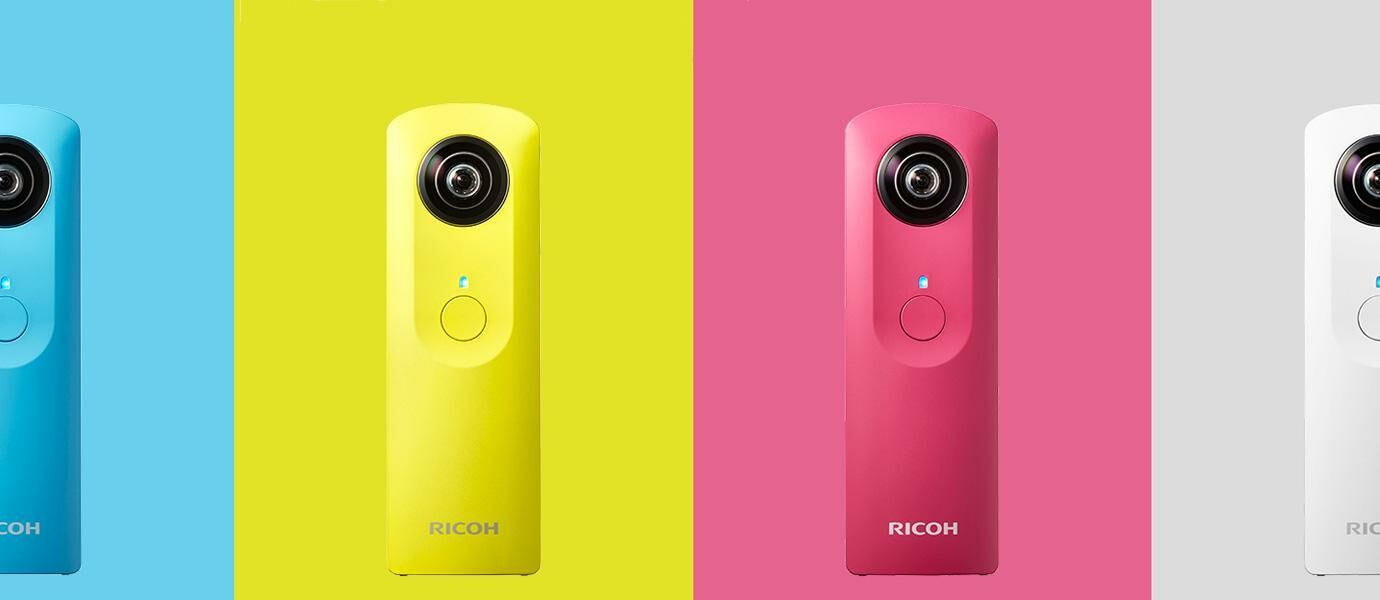
If you are thinking of making a video 360 requires complicated and expensive equipment? This gadget may be an inspiration to you to make video 360 and of course saving in the bag also loh harganya.Ricoh Theta Theta M15 M15 fotoRicoh result is a device that is small enough, even if the see-saw-like Neuralyzer in the movie Men in Black. Ricoh Theta M15 like a camera that can produce images and video 360 degrees. How do I create a 360-degree photos and videos with Ricoh Theta M15? Enough with one click only and you can immediately see the results without the need for editing process to combine pictures or video.
How to Eliminate Annoying Friend Status in BBM

How to Eliminate Annoying Friend Status in BBM

As a user of BlackBerry Messenger aka BBM, you must have had a lot of friends aka BBM contacts in your phone. But among the hundreds of friends, there must be a right that his fuel status lebay? It felt want direct contact delete his fuel. Quiet, Jaka had a trick to overcome it. Here's how to get rid of the status of friends who interfere in the fuel.

BBM provides a status update feature that is very popular. The BBM users can write a variety of things. Starting from the vent, selling, to entertain with funny BBM statuses. See also: How to make fuel Icon Flag !, replacement BBM display picture is practically also facilitate change the image at any time. But if there is often a disruptive fuel status, remove any that no longer appear in the column feeds the fuel. Here's how:

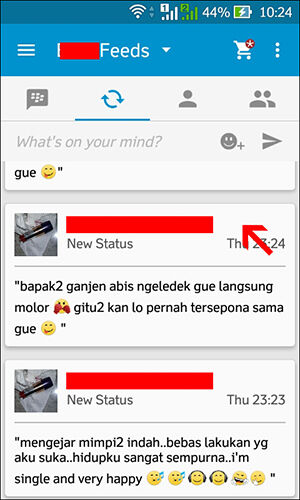
     Open your BBM feeds column.

     Find your friends BBM status disturbing.

     Press and hold a bit longer on the status of your BBM friends.
 

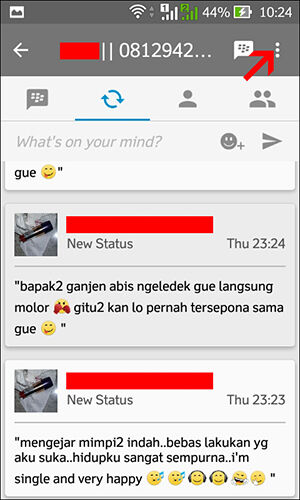
Click the menu icon located in the top right corner.


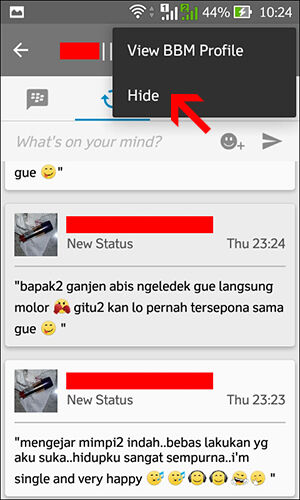
Click "Hide".


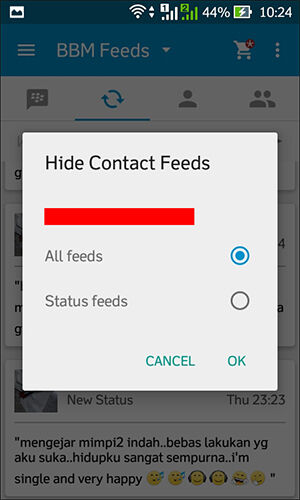
Now there are two options to remove the fuel status of your friends. "Status feeds" to get rid of the status of the fuel in the form of writings, while "All feeds" to hide the fuel status and also drawing its fuel DP as well. So the status of fuel or fuel DP pictures of your friends would never again appear in your BBM Feeds column.

That means get rid of the status of friends who interfere in the fuel without having to delete the contact. Hopefully BBM's activities you more exciting and fun.
4 Ways to Detect Virus Infected Computer

4 Ways to Detect Virus Infected Computer

Internet is easier for users to communicate and carry out various activities. On the other hand, the Internet became a favorite place for the virtual dedemit to spread malware and infect hundreds of thousands of computers around the world.
Malicious programs (malware) is considered as the culprit of the most annoying for computer users. If your computer has been infected with malware, surely you already know how troublesome to clean the malicious program. If you have this, do not delay to immediately clean your PC from malware infections that do not do more damage or infect other computers.
Malware is a computer program that is designed to damage a computer hard drive and perform various other operations that are destructive. While the virus is one of the most popular computer malware. The virus is one of the most damaging types of malware. The damage range from eliminating the files on the computer to cause the computer to crash.
Well, how to recognize the infected computer malware? Here are four (4) that can be tried to anticipate further spread:
1. Use softwareOne of the easiest ways to detect virus-infected PC is to use the software. Thousands of anti-malware application is available on the Internet, both of which can be obtained free of charge or for a fee, such as MalwareBytes or Spybot Search & Destroy. There are also some antivirus tools that can scan for viruses simultaneously malware. The thing to remember is that you must regularly scan your PC regularly and it updated with the latest patches. If not, the possibility of malware detected more and more and will be more difficult to clean.
2. PC slowMalware is generally cause the system to be slow, either a network connection or speed using the application (or open / close the application). If your PC suddenly slows down, the first step to take is to defrag the hard drive, then add RAM (memory). If the PC is still too slow, the possibility of PCs infected with malware.
3. Emerging pop-upOne sign of PCs infected with malware is a pop-up. The emergence of pop-up pornography as a result of malware increasingly becoming a trend lately. If on your PC a pop-up unwanted (particularly that appear even if you do not open a browser), this being one of the signs that the PC has been infected with malware. Generally, pop-ups can not be removed in a standard fashion. In this case, the PC must be booted to the mode "Safe Mode". You also likely require anti-malware application that reliable to remove it.
4. Home page and or link changeIf the browser home page changes when you do not tamper add modifiers, most likely PCs infected with malware. The same thing applies when you are searching a topic in the search engines (Google, for example), then click on the link provided by Google and then you are directed to another link at random. If you look at the 'behavior' like this, your PC is likely infected with malware or viruses.
Back To Top