on laptops / notebooks that use Windows 7 as the operating system is not really difficult, just sometimes trivial things like this can trouble us if the times when we need to rely on an internet connection with wifi internet network "without wires" that are essential for the purposes of a sudden, Naah to overcome the wifi network that would not be detected by Windows 7 laptop can listen to my explanation on this article.
To How To Overcome Wifi can not connect to the Internet on your laptop / notebook windows 7 you, here are some things you need to make sure before:
1. Being in the area Wifi Internet: Prior to first make sure the other check if you already are in a wifi area, of these factors usually occurs in a closed room that led to the wifi network was not able to get into your room.
2. Network Wifi Normal: If the wifi network in your area is normal, then the next you can check other factors that cause wifi internet is not detected on your laptop / notebook you.
If both of the above you have the normal checks and turns in the sense of being in the area adan wifi and wifi network conditions were normal, the following ways to overcome the wifi is not detected well in laptop windows 7:
1. Turn on the Wifi internet on your laptop, the way in Fn + F10 (for laptop axios), there is a Fn + F3 where every type of laptop has a different combination of an easy way to find out you click bebarengan button (Fn + symbol buttons signal / transmitter) and in several types such as toshiba laptop wifi indicator lights will illuminate indicating you have wifinya signal on / switch.
2. Furthermore, if you have not finished as well, but had to follow the way of the above then you can do this way, namely:
- Go to the control panel via Start >> Control Panel, then on the View By: you choose the large icon that looks like this
- select Windows Mobility Center, so it will look like this
 - In the wirelles will look wirelless status "wifi" internet you, if the status "wireless off" means that your wifi is still active.
- Next you can activate your wifi by selecting the "Turn Wireless On"
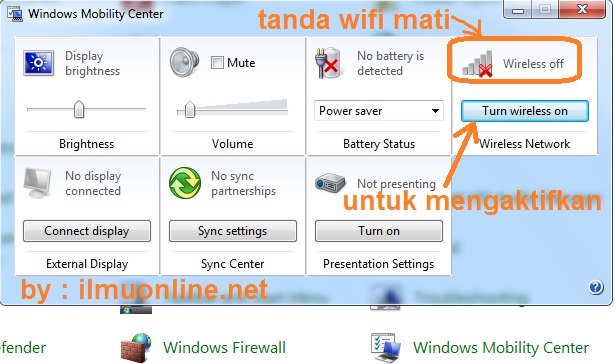 - If you have, to see the results if it works or not just try to open a browser and try to access the internet.
0 Comment for "Wifi Is Not Detected On The Laptop Windows 7"